- Out-of-Stock
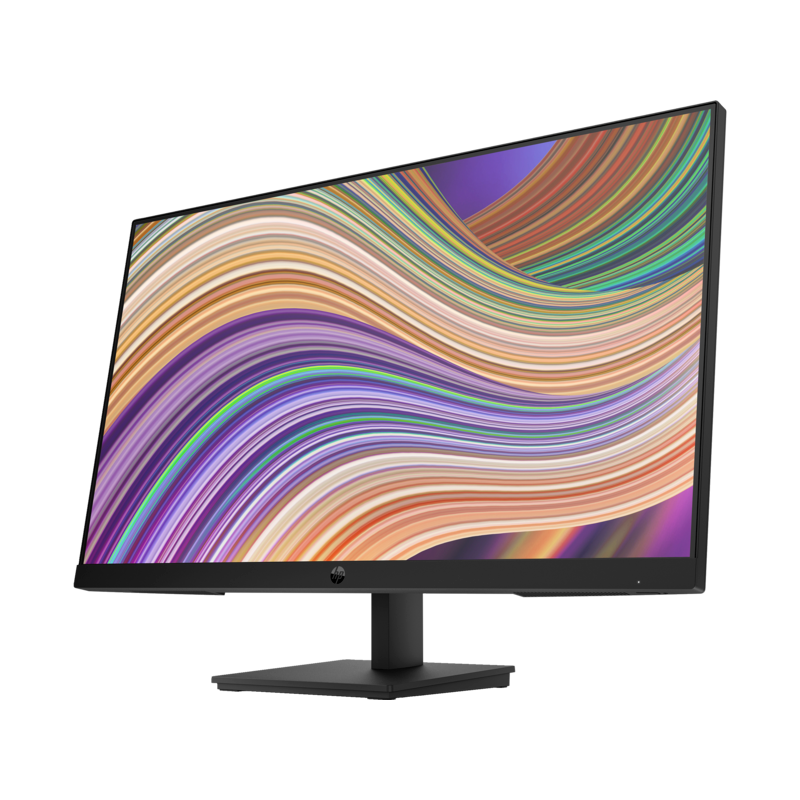


27-inch Full HD (1920×1080) IPS display in Kenya with wide 178° viewing angles
75Hz refresh rate and 5ms GtG (overdrive) for smooth visuals and reduced motion blur
Connectivity: 1 HDMI 1.4, 1 VGA, 1 DisplayPort for multi-device setups
Low Blue Light mode, Flicker-Free performance, anti-glare coating for eye comfort
Clean workspace thanks to built-in neat cable management
Joypad OSD for fast display configuration, HP Display Center support
Energy-efficient design with eco-friendly packaging
1-year warranty in Kenya
 Security policy
(edit with the Customer Reassurance module)
 Delivery policy
(edit with the Customer Reassurance module)
 Return policy
(edit with the Customer Reassurance module)
The HP P27 G5 is designed for productivity, learning, and seamless multi-tasking. It delivers a large and vibrant 27-inch viewing area with IPS technology that ensures consistent color and clarity from any angle.
Full HD resolution (1920 × 1080) for sharp text, presentations, and media
IPS panel with 178° viewing angles ensuring accurate colors from side to side
1000:1 contrast ratio for balanced image depth
Anti-glare surface to reduce reflections in bright environments
Subtly warmer tones via Low Blue Light mode to help reduce eye fatigue
Flicker-free technology maintains stable screen performance
75Hz refresh rate enhances fluidity in scrolling, videos, and light gaming
5ms GtG with overdrive reduces smearing in fast-moving scenes
1 × HDMI 1.4
1 × DisplayPort
1 × VGA
Easy setup across desktops, laptops, and docking stations
Neat cable management for clutter-free setups
Optimized for dual-screen workflows with minimal bezel distractions
HP Display Center software allows screen partitioning, easy customization, dimming options
Supports HP B200 PC mounting bracket to attach a compact PC behind the monitor
EPEAT registered
ENERGY STAR and TCO certified
100% recyclable packaging
HP P27 G5 Monitor
AC power cable
User documentation
Perfect for home offices, students, content creators, and business workspaces. Available from Passcode East Africa Techverse Limited as a spacious and dependable display option for everyday use in Kenya.
Compared to smaller 24-inch models:
Increased workspace on the 27-inch screen improves productivity
Wider viewing angles and richer color from IPS technology
More ports (HDMI + DisplayPort + VGA) ensure better future adaptability
Great upgrade for users who need more screen real estate.
Does the HP P27 G5 support wall or arm mounting?
It supports mounting accessories such as HP’s B200 bracket for PC attachment and external mounting solutions, depending on configuration.
Is it suitable for long working sessions?
Yes. With Low Blue Light, anti-glare, and flicker-free features, it is designed for extended comfort.
Can it connect to older PCs?
Yes. The VGA port makes this monitor compatible with legacy devices while still offering HDMI and DisplayPort for newer hardware.
Is it good for dual-screen setups?
Yes. The slim-bezel design supports seamless side-by-side multi-monitor workflows.
| 75 Hz Refresh Rate | Experience smooth, life-like video and clear detail with a 75hz refresh rate that provides fluid movement from frame to frame. 1 |
|---|---|
| IPS Panel | No matter where you stand, IPS technology ensures image accuracy and consistency across wide 178-degrees horizontal and vertical viewing angles. |
| Easy Joypad OSD Button | It's never been easier to configure your display with Joypad OSD button to adjust brightness, resolution, and volume. |
| Low-Blue Light Mode | Keep your eyes comfortable with subtly warmer display colors onscreen. |
| With the Environment in Mind | Meeting the latest standards with EPEAT® registered, ENERGY STAR® and TCO certifications. |
| Thoughtful Product Packaging | We use 100% recyclable packaging that meets recycling requirements, so it can stay out of the landfill. |
| Neat Cable Management | Neat cable management solution for a cleaner workspace and more productivity. |
| HP Display Center | Customize your display with easy, intuitive HP Display Center software that lets you tailor your settings, partition screens, and even dim the screen. |
| HP B200 PC Mounting Bracket | Save space by attaching the B200 bracket to the base of the monitor and your PC. |
27-inch Full HD (1920×1080) IPS display in Kenya with wide 178° viewing angles
75Hz refresh rate and 5ms GtG (overdrive) for smooth visuals and reduced motion blur
Connectivity: 1 HDMI 1.4, 1 VGA, 1 DisplayPort for multi-device setups
Low Blue Light mode, Flicker-Free performance, anti-glare coating for eye comfort
Clean workspace thanks to built-in neat cable management
Joypad OSD for fast display configuration, HP Display Center support
Energy-efficient design with eco-friendly packaging
1-year warranty in Kenya